How to check Codex quota and reset times
By ResetPing · Updated October 26, 2026
To check how much Codex allowance remains, start with the account you actually use. OpenAI provides an official usage dashboard; ResetPing lets you view the quota read by your linked Mac from your iPhone. A public reset announcement is not a substitute for checking that account.
Start with the official usage view
Open the Codex usage dashboard while signed in to the relevant ChatGPT account. OpenAI also documents /status for checking remaining limits during an active Codex CLI session. See the official usage guidance.
Do not assume a fixed number of messages or identical windows for every plan. OpenAI explains that task size, model and other factors affect usage. Use the limits and reset times shown for your own account rather than calculating them from a subscription price.
View quota on iPhone with ResetPing
- Connect your iPhone and Mac, then complete ChatGPT authorization and the first quota read.
- Open the connected account's details on iPhone. Confirm the account identity before interpreting its quota.
- Read each available window's remaining percentage and reset information. The windows shown depend on the data returned for that account.
- Check the last update time and any offline or connection warning. Use Refresh Quota when the linked Mac is ready and you need a fresh read.
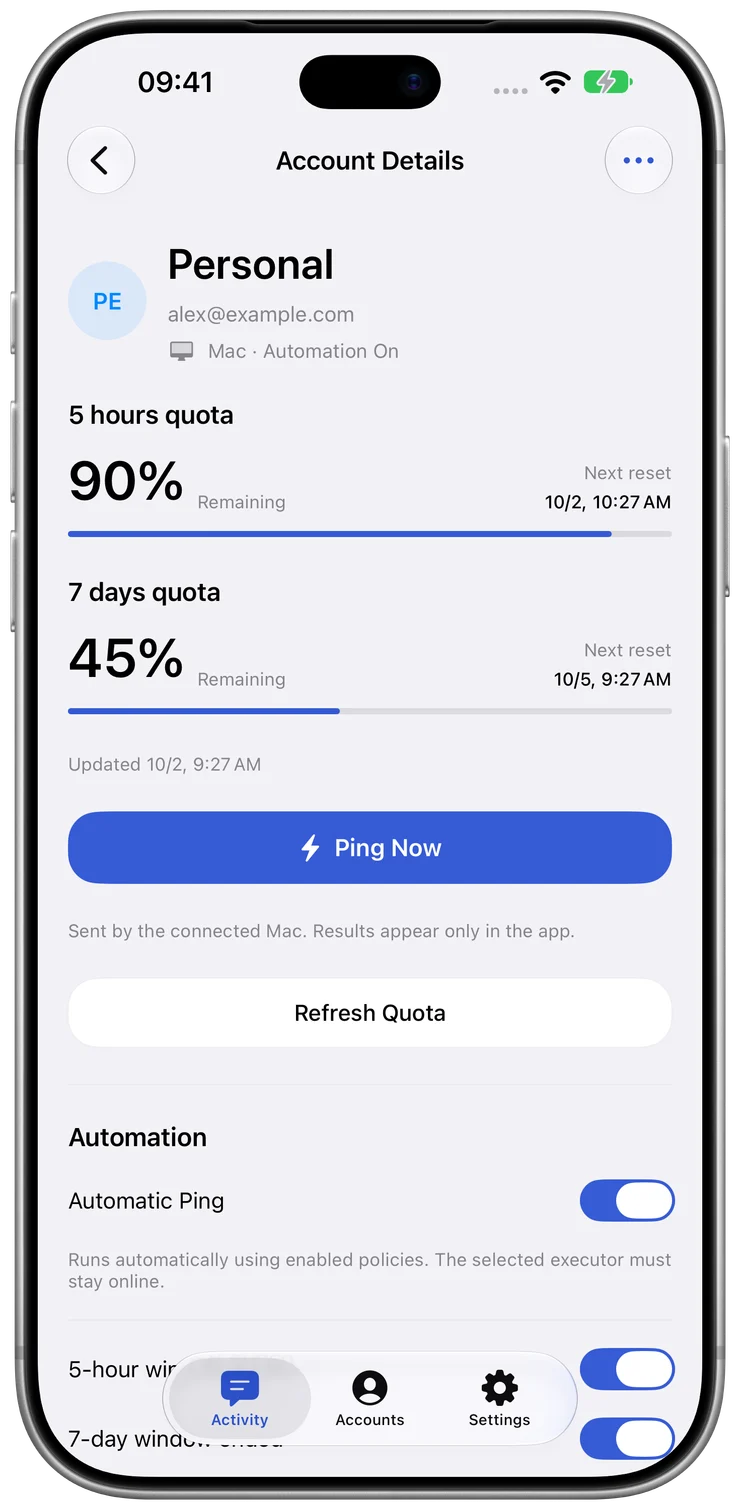
The screenshot below is an isolated demonstration of the account view. Its values are examples, not current account limits.
Read the three signals together
- Remaining percentage: the unused share of that window at the last successful read. It is not a guaranteed number of tasks left.
- Reset time or countdown: timing information associated with that window. A countdown reaching zero alone does not establish that a new quota read has succeeded.
- Last update: when the snapshot was observed. An old snapshot can remain visible while the Mac is offline or a refresh fails.
For example, an old snapshot can show remaining quota even though you have used Codex since that read. Reconnect the Mac and refresh before treating the number as current. If a window has no reset time, do not infer one from another account or another plan.
When the numbers look wrong
First compare the account identity, then the snapshot time, then the Mac's connection state. If authorization needs attention, complete it on the linked Mac. A refresh retrieves quota; Ping Now sends a request and can consume quota, so it is not a replacement for a refresh.
If you arrived after seeing a reset announcement, read how announcements differ from personal recovery. For persistent errors, contact support with app versions and the error text, without passwords, codes or credential files.
ResetPing is an independent product, not affiliated with or endorsed by OpenAI. It does not increase your quota or guarantee a reset.