Set up ResetPing on iPhone and Mac
By ResetPing · Updated October 26, 2026
ResetPing uses your Mac to read Codex quota and execute Ping. The iPhone app displays synced information and lets you manage account strategies. Connecting a Mac, authorizing ChatGPT and successfully reading quota are separate steps.
Before you start
Install the iPhone and Mac apps. The Mac download is for Apple silicon and requires macOS 13 or later. Connected-account features require a compatible ChatGPT account. Keep the Mac signed in to its user session, awake, online and allowed to run the background service.
ResetPing sign-in links your devices. ChatGPT authorization connects the account whose quota you want to read. These identities serve different purposes; confirm the intended ChatGPT account during authorization.
Connect in five steps
- On iPhone, sign in to ResetPing using your email verification code.
- On Mac, sign in with the same ResetPing email. Alternatively, generate a pairing QR code or code on Mac, then scan or enter it on the signed-in iPhone and confirm the pairing.
- On iPhone, add a ChatGPT account and select the linked, online Mac. Start Mac authorization.
- On Mac, open the pending authorization in ResetPing and continue to the official authorization page. Confirm the intended ChatGPT account. If the official page says device-code sign-in is disabled, follow its instructions to enable it in ChatGPT security settings.
- Wait for authorization and the first successful quota read. When the connected-account confirmation appears on iPhone, check the identity and open its details.
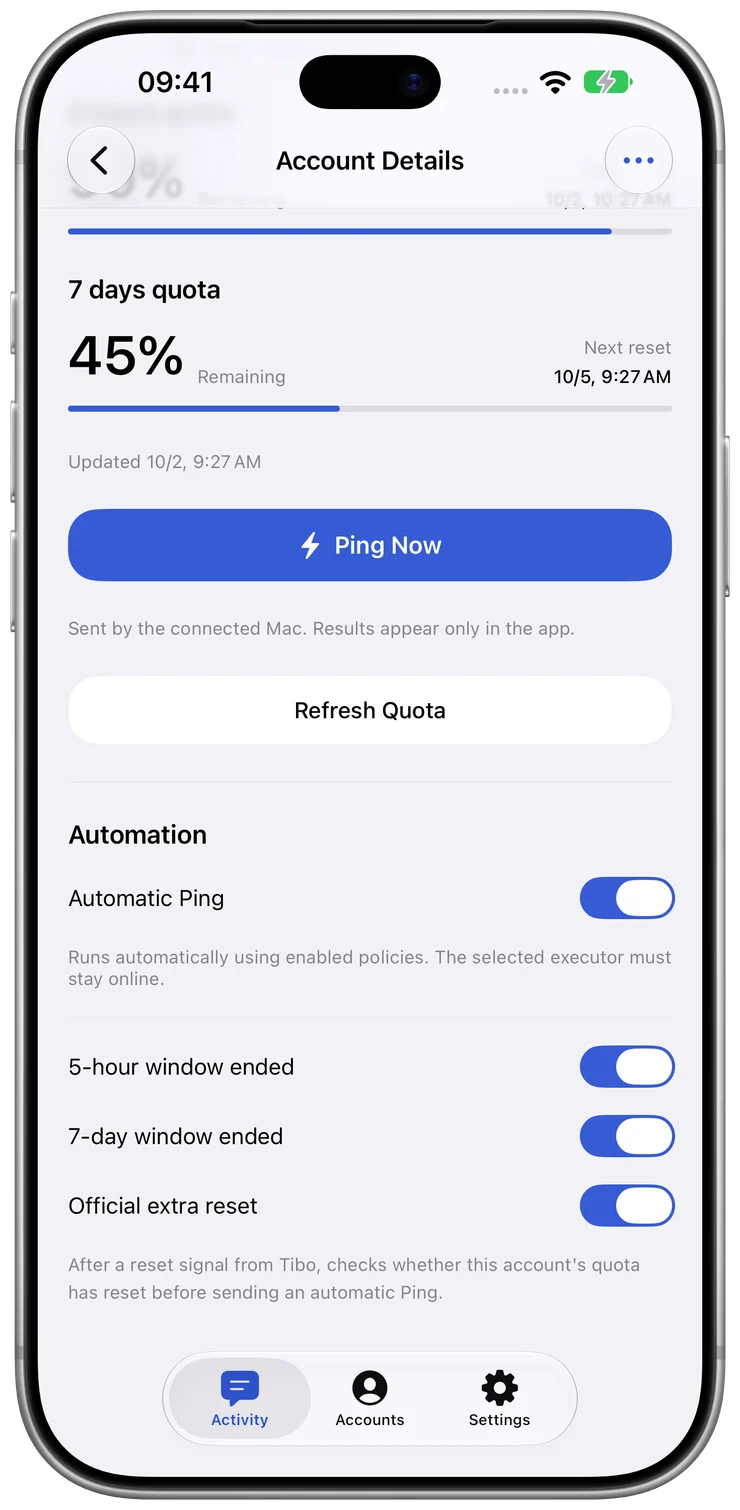
Automatic Ping remains off after the first connection. If your ResetPing plan includes automation, review and enable the relevant account strategies yourself. The screenshot below illustrates strategy controls using isolated demo data.
Mac offline or quota not updating
Check these in order:
- Mac readiness: open ResetPing on the linked Mac, check the network, allow background operation and confirm its service is running. Sleep or loss of connectivity prevents execution.
- Device association: confirm that the iPhone is linked to the intended Mac, especially after reinstalling or replacing a Mac.
- ChatGPT connection: a Mac showing online does not prove ChatGPT authorization succeeded. Resolve any account connection error and retry the quota read if offered.
- Snapshot freshness: reconnect, use Refresh Quota, and check the new observation time. Learn how to read quota windows.
Closing the Mac window is different from stopping an enabled background service. Conversely, a running interface cannot make a sleeping or disconnected Mac available to execute work.
Automatic Ping did not run
Confirm the ResetPing plan supports automation, the account strategy is enabled, the account is connected and the Mac is ready. Then inspect the activity result. An announcement or a countdown reaching zero is not proof of a qualifying recovery or a completed Ping; see the distinction.
Free includes one account and manual Ping; Plus includes one account with automation; Pro supports up to five accounts with automation. These are ResetPing plans, separate from ChatGPT subscriptions. Current purchase terms are shown in the iPhone app.
Getting help safely
Contact support with the app version, OS version, failed step and error text. Hide personal information in screenshots. Never send passwords, verification or pairing codes, access tokens, or Codex credential files.
Reusable Codex credentials stay on Mac, while the service processes information needed for device coordination and syncing. See the Privacy Policy for details. ResetPing is independent of OpenAI and does not increase quota or guarantee resets.